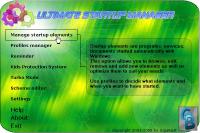
Take total control over your Windows startup. Manage all auto-start programs, create profiles to choose from during startup. Anti-virus protection. Turbo Mode to get the best performance of your computer as possible. Advanced access control.
Take total control over your Windows startup. Make your Windows start and work faster, more stable. Manage all auto-start programs, create profiles to choose from during startup. Extra anti-virus protection. Turbo Mode to get the best performance of your computer as possible. Advanced access control. Powerful, unique but still easy to use... Overview:
During startup Windows automatically loads many programs into memory. Some of them works in a background, some waits for user action as an icon on the taskbar. All of them uses computer's resources (memory, CPU time...) With USM you can easily manage all these programs. Ultimate Startup Manager acts completely different way than other startup tools - you create profiles which contain any set of programs. During startup just select the profile you want to run. You can also associate desktop settings and resolution with any profile.
With USM you can restrict access to your Windows system. You can use standard password protection, but USM delivers you an unique feature - Kids Protection System (KPS). With KPS you can create a list of items (applications, movie clips or any other documents). During startup USM asks for password. Without valid password it is only possible to run items from the list. It is impossible to run anything else.
USM can also help you to protect your computer against viruses, spy-ware, add-ware and tons of other trash you don't want to have in your system.
The great and unique feature of USM is the ability to run programs on a clean system - even without shell. This is called "Turbo mode" and it provides the best performance and stability possible on your system. During startup you can select programs to start in this mode and even create profiles to automatically enter this mode.
Reminder helps you to remember important events. You can compose short messages which will be shown during system startup. Each event can be shown every day, once a week or on desired day.Operating system: Win95,Win98,WinME,WinNT 4.x,WinXP,Windows2000 Release notes: New Release
Step on the gas...and stay in control. 7Smoker Pro allows you to change various settings in the Windows Registry. These settings can improve the performance of your computer.
Price: $9.99, Rating: 6, Downloads: 253 Download
Make your PC run like new! Protect your data from malware and intruders. System Mechanic Pro combines 6 powerful products to optimize your registry, defragment drives and memory, speed up your computer, scrub personal data, and remove spyware.
Price: $27.98, Rating: 6.97, Downloads: 229 Download
iSysCleaner is a freeware system optimization tool. It removes all unused files from your system with few clicks and faster - freeing up valuable hard disk space.
Price: $0, Rating: 10, Downloads: 163 Download
Stellar Smart - A Hard Drive / Disk monitoring software to diagnosis and monitor the activity of Hard drive as Temperature, Head Flying Height, Spin-Up Time.Stellar Smart acts as an "early warning system" for pending hard disk problems.
Price: $49, Rating: 8, Downloads: 144 Download
User Rating
Rating:2.2 out of
5 Based on13 ratings.
13 user reviews.

 Windows Startup Manager 3.0 details